
Disable a user account on Ion Reporter™ Server
An administrator can disable an Ion Reporter™ Software user account. A disabled user account can be enabled at a later time.
When a user account is disabled, the email address is not available to be reused for a different user account. If you want to reuse the email address, you must delete the user from the software.
- Click the Admin tab.
- In the Users screen, click the hyperlinked email address of the user.
-
In the Edit User dialog box, in the Status list, select Disabled, then click Save.
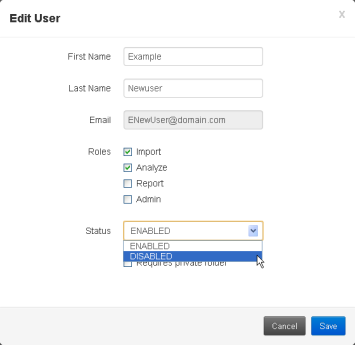
The user account is disabled. You can enable the account again at any time.