
Preferred transcripts in default analysis workflows
The predefined analysis workflows that are provided in Ion Reporter™ Software include an annotations set with a preferred transcript set, the RefGene canonical transcripts. The default annotation set that includes the default RefSeq canonical transcripts is named All.
Default analysis workflows that use the All annotation set report only transcripts that are included in the RefGene canonical transcripts. By default, the following RefGene canonical transcripts are included in the All annotation set:
-
RefGene
-
Functional
-
Canonical
-
Transcript Scores
All other transcripts are filtered out and not reported.
To instead have additional transcripts reported in your analyses, see Create annotation set without preferred transcript sets.
Create annotation set without preferred transcript sets
- In the Workflows tab, click Presets.
-
Click .
-
In the Reference drop-down menu, select Gene Model as the type of annotation source.
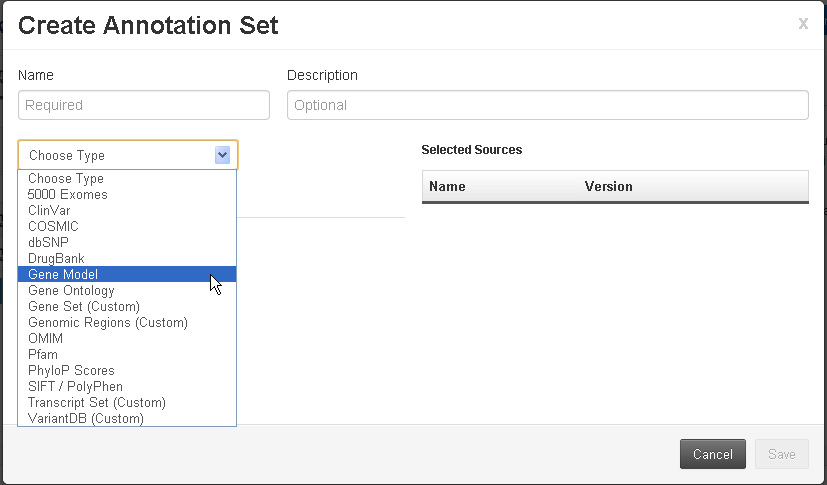
-
In the Choose Existing tab, click Use for either the RefSeq Gene Model or the Ensembl® Gene Model.
Note: Only one gene model can be added to each annotation set.
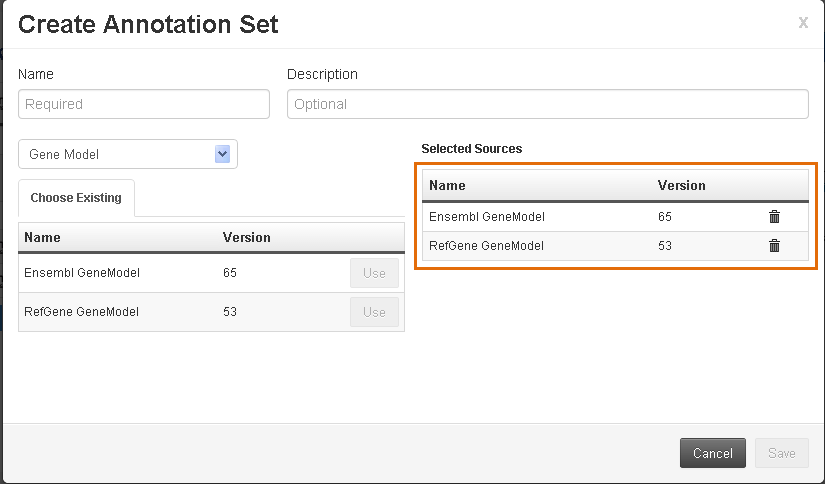
-
In the Reference drop-down menu, select Gene Model as the type of annotation source.
- Enter a descriptive name for the custom annotation set.
- (Optional) Enter a description for the custom annotation set.
-
Click Save.
The new annotation source is listed in the Workflow Presets screen.