
Create a gene symbol filter
To filter variants in analysis results by many gene symbols, you can create a filter that is based on gene symbols, then add the filter to a filter chain.
If you have a small number of gene symbols to that you want to filter in an analysis, see instead Create a gene symbol filter chain.
IMPORTANT! If using a single filter with a NOT operator, do not use a parenthesis. If parenthesis is used, the filter chain can be saved but an error occurs when applying the filter chain in analyses results. For example, use NOT Filtered Coverage instead of NOT (Filtered Coverage).
Before you complete this procedure, create a text file that contains one gene symbol on each line. For example:
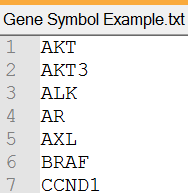
Gene symbols must use the nomenclature standard that is published by the HUGO Gene Nomenclature Committee (HGNC). Gene symbols that are used in the file must match the nomenclature, however, the letters are not case-sensitive.
- In the Workflows tab, click Presets.
- Click .
-
Name, then upload the text file that contains the gene symbols.
- Click Save.
The gene symbol filter is available to be added to a new filter chain or to an existing filter chain. Then, the filter chain can be added to an analysis workflow. For more information, see Add a filter chain to an analysis workflow.
You can also add the filter chain to analysis results or to a visualization. For more information, see Apply a filter chain to analysis results and Use filter chains to change analysis results.