
Review analysis results for Ion AmpliSeq™ HD panels
-
In the Analyses tab, click Overview.
The Analyses table lists all available analyses results.
- Click the column headings to sort the results. Alternatively, use the available filters or the Search function to limit the list of analyses.
-
In the Analysis column, click the link to open an analysis of interest.
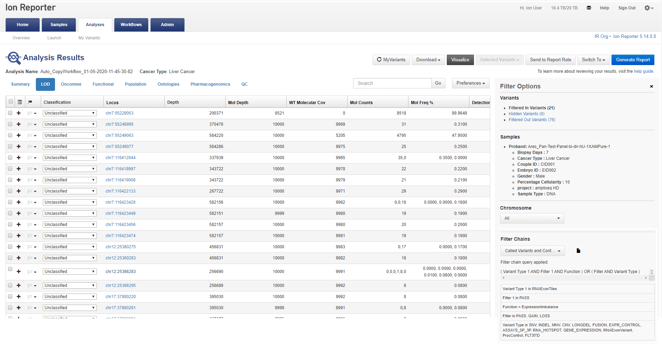
The Analysis Results screen opens to the results for the selected analysis.
-
(Optional) In the Filter Options section, select a filter chain from the Filter Chains list to view analyses results as described.
If you download filtered variants, the downloaded files reflect the filter chain that is applied and saved to the analysis. Ensure that you click Save Filter Chain to save an applied filter chain to the analysis before you download filtered variants.
Option
Description
Called Variants and Controls
This filter chain reports all variants (either hotspots or novel) that pass the filter and are not called as reference or NOCALL. Variant types include SNV, INDEL, MNV, CNV, LONGDEL, FUSION, EXPR_CONTROL, ASSAYS_5P_3P, RNA_HOTSPOT, GENE_EXPRESSION, RNAExonVariant, ProcControl, FLT3-ITD, and RNA Exon Tiles.
Called Hotpot Variants and Controls
This filter chain reports all hotspot variants that pass the filter and are not called as reference or NOCALL. Variant types include SNV, INDEL, MNV, and RNA Exon Tiles.
Variant Matrix Summary
Select this filter chain for analysis results that contain the same set of variants that are included in the Variant Matrix Analysis visualization for Ion AmpliSeq™ HD analysis results.
The Variant Matrix Summary filter chain filters in:
-
Positive hotspot calls
-
Positive gene-level CNV GAIN or LOSS calls
-
FLT3-ITD variants
-
Non-wild-type intragenic structural variations
-
For TagSeq Breast and TagSeq Pan-Cancer assays: non-hotspot variants in TP53 with QUAL >50 and Allele Frequency > 1.0 (Breast) or 0.5 (Pan Cancer)
This filter chain allows analysis results to be exported. You can then import the results into another software application for further analysis.
Filter variant types include: SNV/INDEL, CNV, fusions, and RNAExonVariants.
If you use the Oncomine™ Myeloid MRD analysis workflow, a FLT3-ITD variant subtype named Combined can be reported in analysis results. The Combined subtype is a value for the sum of all reported FLT3-ITD variant allele frequencies.
Oncomine Variants
Apply the Oncomine Variants filter chain to show only the variants that are annotated with the Oncomine™ Variant Annotator plugin. For more information, see Oncomine Variant Annotator plugin criteria.
The analysis results update immediately to reflect the filtered results.
-
- (Optional) Create final reports from analysis results and publish a final report or save the report as a final report template. Or, create reports from visualizations in Ion Reporter™ Software, and enable electronic signatures for reports. For more information, see Create a final report, Create a visualization report and Generate a final report and approve with an electronic signature.
Example of Analysis Results screen, LOD view, and Filter Options pane
Use filter chains to change analysis results
You can use filter chains in Ion Reporter™ Software to change the view of analysis results.
This example shows how to review Oncomine™ analysis results for a sequencing run that uses a TagSeq analysis workflow, then use filter chains to change the results.
-
In the Analyses tab, click the link in the Analysis column to open an analysis of interest.
The analysis results appear with the Oncomine™ Variants filter chain applied.
-
(Optional) In the Filter Options pane, select a different filter chain from the list.
Option
Description
Called Variants and Controls
This filter chain reports all variants (either hotspots or novel) that pass the filter and are not called as reference or NOCALL. Variant types include SNV, INDEL, MNV, CNV, LONGDEL, FUSION, EXPR_CONTROL, ASSAYS_5P_3P, RNA_HOTSPOT, GENE_EXPRESSION, RNAExonVariant, ProcControl, FLT3-ITD, and RNA Exon Tiles.
Called Hotspot Variants and Controls
This filter chain reports all hotspot variants that pass the filter and are not called as reference or NOCALL. Variant types include SNV, INDEL, MNV, and RNA Exon Tiles.
Variant Matrix Summary
Select this filter chain for analysis results that include the same set of variants that are included in the Variant Matrix Analysis visualization for Ion AmpliSeq™ HD analysis results.
The Variant Matrix Summary filter chain filters in:
-
Positive hotspot calls
-
Positive gene-level CNV GAIN or LOSS calls
-
FLT3-ITD variants
-
Non-wild-type intragenic structural variations
-
For TagSeq Breast and TagSeq Pan-Cancer assays: non-hotspot variants in TP53 with QUAL >50 and Allele Frequency > 1.0 (Breast) or 0.5 (Pan Cancer)
This filter chain allows analysis results to be exported. You can then import the results into another software application for further analysis.
Filter variant types include: SNV/INDEL, CNV, fusions, and RNAExonVariants.
If you use the Oncomine™ Myeloid MRD analysis workflow, a FLT3-ITD variant subtype named Combined can be reported in analysis results. The Combined subtype is a value for the sum of all reported FLT3-ITD variant allele frequencies.
-
- Review the results.