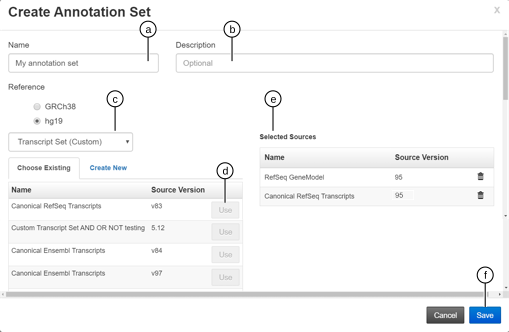
You can create custom annotation sets in Ion Reporter™ Software. A custom annotation set is a type of workflow preset that you can add to an analysis workflow so that you can launch analyses that use the custom annotation set.
-
In the Workflows tab, click Presets.
-
Click .
-
In the Create Annotation Set screen:
-
Enter a descriptive name.
IMPORTANT! You can use the words AND, NOT or, OR in an annotation set name in Ion Reporter™ Software 5.16 and later.
-
(Optional) Enter a description of the annotation set.
-
From the Choose Type list, select the annotation source or sources that you want to add to the preset.
-
Click Use next to the annotation source that you want to use.
The source is added to the Selected Sources list in your annotation set.
-
Repeat this process for each annotation source that you want to add to your annotation set until your list of Selected Sources is complete.
-
Click Save to save the annotation set.
The annotation set appears in the Workflow Presets table and is available in the Annotation step when you create an analysis workflow.
-
(Optional) When your preset works as you intend, the analysis workflow is ready for use in production. Select the preset in the Workflow Presets table, then click to lock the analysis workflow. You cannot undo a lock action.