
Visualize identified variants in an Oncomine™ analysis from a TagSeq analysis workflow
You can view a summary of data about the identified variants, and toggle to other views that provide more details about the same variants in Ion Reporter™ Software.
- Under the Analyses tab, click Overview.
- Click the column headings to sort the results, or use the available filters to limit the list of analyses.
- Select the checkbox adjacent to each analysis of interest; select two or more analyses to visualize a side-by-side comparison of multiple results. Click Visualize.
Note: Alternatively, select the analyses, then click
 ActionsVisualize next to Selected Analyses.
 - The Analysis Visualization screen opens to the Variant Matrix tab with a summary of all of the identified SNVs, CNVs, and Fusions (Lung only).
Click a hyperlinked Gene name to be redirected to the HGNC report for that gene.
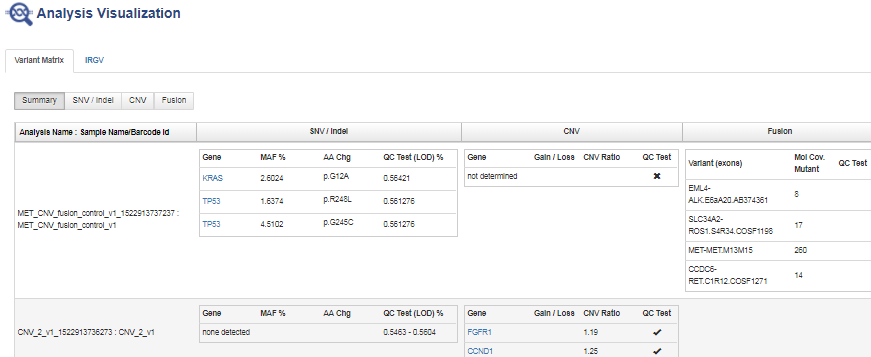
Example visualization of an Oncomine™ assay used with a TagSeq analysis workflow.
A none detected result indicates that down to the displayed limit of detection (LOD), no variants were observed in the sample within or above the LOD range.
- Click SNV/INDEL, CNV, or Fusion (Lung only) to view detailed analysis metrics.
- In the SNV/INDEL, CNV, or Fusion detailed view, click the link in the Locus column to view specific variants in the Ion Reporter™ Genomic Viewer (IRGV).
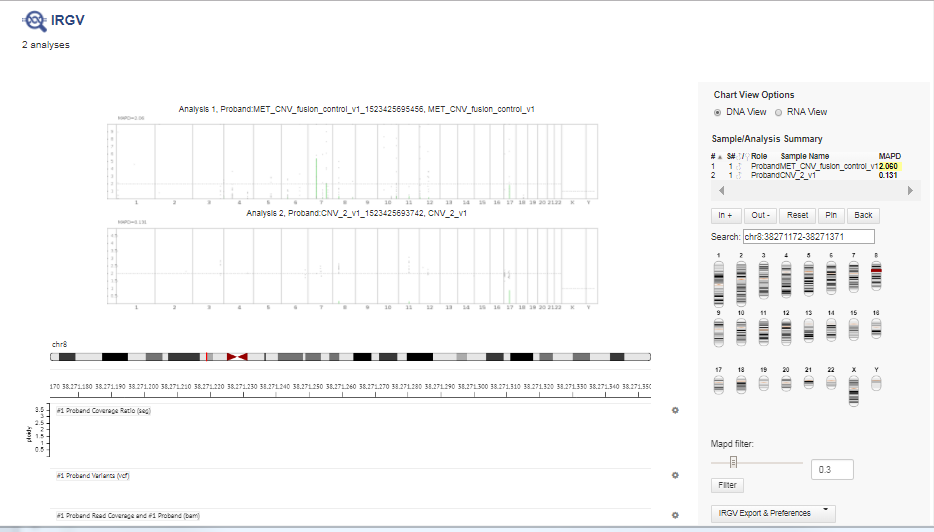
Example analysis results for CNV variants in the Ion Reporter™ Genomic Viewer (IRGV).
The IRGV viewer displays CNVs as ploidy assuming 100% tumor cellularity, whereas we report CNVs as fold difference.