
Genomic segmentation analysis results
The Ion Reporter™ Software can detect heterozygous population SNPs to determine ploidy levels of genomic segments, when some IR analysis workflows are used, such as the Oncomine™ Comprehensive Assay Plus, DNA. The genome is divided into contiguous segments of similar ploidy levels using a circular binary segmentation (CBS) algorithm. Log odd ratios for variant allele frequency of observed population SNPs (by TVC) and copy-number (CN) ratios (by CNV pipeline) for each segment are calculated. Log odd ratio and CN ratios are then used to infer:
-
Tumor cellularity percentage (percentage of tumor cells in the sample)
-
Loss-of-heterozygosity (LOH) for each genomic segment. Segment level LOH events are intersected with targeted gene boundaries to determine LOH events in selected genes. Segment level LOH events are also aggregated to determine genomic (%LOH).
-
Genomic Instability Metric (GIM)
To download the results, see Download filtered variants.
Visualization of genomic segmentation analysis, Allele Specific Copy Number plots
-
Do one of the following to visualize analysis results that used an analysis workflow to detects genomic segmentation and allele specific copy number.
Option
Description
Visualize analysis results from one or more analyses simultaneously from the Analyses table.
In the Analyses table, select a row for an analysis or select the checkbox next to one or more analyses that you want to visualize simultaneously, then click Visualize. Alternatively, click .
Visualize analysis results individually from the Analysis Results screen.
In the Analyses table, click an analysis hyperlink in the Analysis column to open the Analysis Results, then click Visualize.
Note: The Analysis Visualization screen opens to the TMB tab by default.
-
Click the Allele Specific Copy Number tab.
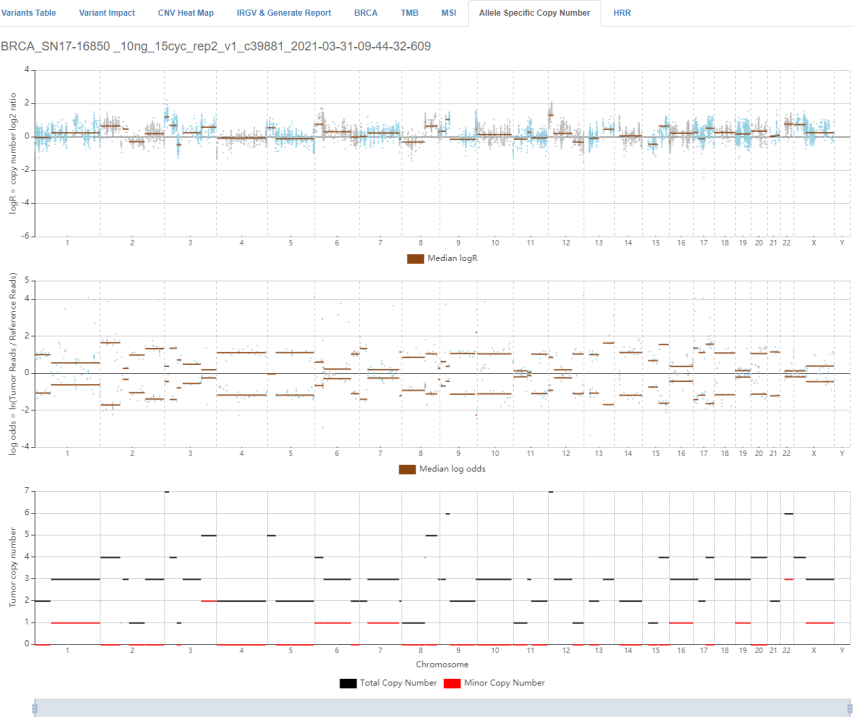
The Allele Specific Copy Number tab displays plots showing copy number variation across the entire genome. If visualizing multiple analyses simultaneously, individual sample results are listed sequentially. This visualization shows identified genomic segments (shown as horizontal lines) using log2 ratios from the Copy Number Variation (CNV) analysis and log odds from the Torrent Variant Caller (TVC) analysis. Segments are identified using the heterozygous population SNPs (shown as dots in the upper two panels) targeted by assay amplicons.
Plot scale (x-axis)
Description
logR = copy number log2 ratio
Log2 ratios (top panel) of the copy-number estimates relative to the baseline copy-number as calculated by the CNV algorithm for each amplicon in the assay. Ratio representative Genome segmentation overlay (horizontal brown bars) shows segments with similar log2 ratios clustered together.
log odds = ln(Tumor Reads / Reference Reads)
Log odds (middle panel) for each heterozygous SNP in the assay. Log odds is calculated as the natural logarithm of the ratio of the sequencing reads with variant allele and reference allele that are obtained using Torrent Variant Caller (TVC). Genome segmentation overlay (horizontal brown bars) shows segments with similar log odds clustered together. Because the variant allele could be major or minor for any SNP and the corresponding log odds could be positive or negative, the long odds are displayed as segments that are mirror images around 0.
Tumor Copy Number
Bottom panel shows the total (black horizontal line) and minor (red horizontal line) copy-number estimates for each of the identified genomic segments (top two panels). Genomic segments where total CN ≥1 and minor CN = 0 are segments with LOH. There may exist genomic segments for which minor copy-number estimates can not be determined.
-
(Optional) Select one of the following actions.
To see the gene or gene segment information corresponding to the genomic loci, hover over a dot in the plot.

To save a PNG image of all three plots, click Export Image to save a PNG image of all three plots to a location of your choice.