
Variant Matrix tab
Note: To review variant information for analyses with Ion AmpliSeq™ workflows, see Variants Table tab.
-
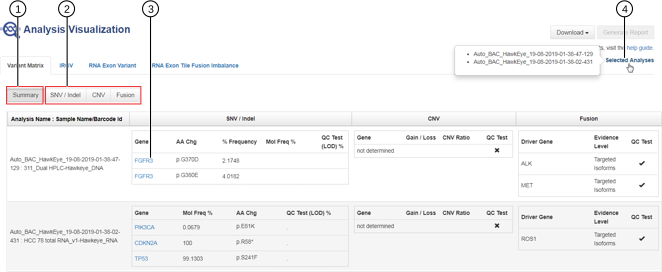
The Summary screen displays all called SNV / Indel, CNV, and Fusion variants and a subset of analysis metrics for each variant. If you selected more than one analysis, the summary of called variants for each analysis is displayed side by side.
-
Click SNV / Indel, CNV, or Fusion to view detailed analysis metrics for each variant (see Representative detailed analysis metrics for SNV / Indel variants).
-
In the Gene column, click the gene symbol to access the HGNC report for that gene.
-
Click Selected Analyses to view the list of the analyses that were selected for visualization.
-
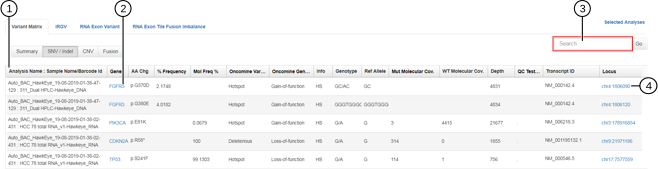
If you selected more than one analysis for visualization, all analyses and their corresponding variants will be listed in the same table.
-
In the Gene column, click the gene symbol to access the HGNC report for that gene.
-
Use the Search field to search the variants list for a specific gene or locus.
-
In the Locus column, click the chromosome location to open the IRGV report for that locus.
-
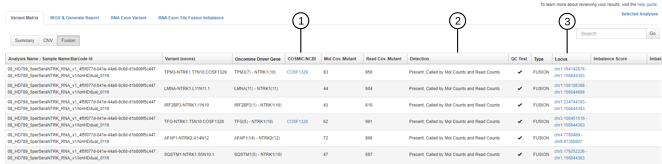
In the COSMIC/NCBI column, you can click the COSMIC ID or NCBI GenBank ID to access the detailed report for the gene in these public web sites.
-
In the Detection column, you can view if the variant is Present or Absent, and the reason for the call. In this example, all of the fusion variants shown are present on the basis of molecular counts and read counts (Called by Mol Counts and Read Counts).
-
In the Locus column, click the chromosome location to open the IRGV report for that locus.